
 Deutsch
 Französisch
 Englisch
 Spanisch
 Italienisch
 Russisch

Espace Reva
2 allée Josime MARTIN
13160 CHATEAURENARD
FRANCE
Tel : 33 9 77 63 61 94
Faxnummer : 33 4 32 62 71 35 Tel: 33 9 77 63 61 94

FAQ : IDEAL ADMINISTRATION
Verwalten Sie Ihre Windows Active Directory-Umgebungen und Ihre Workgroups über eine einzige KonsoleMit IDEAL ADMINISTRATION 2026 wird die Active-Directory-Verwaltung noch umfassender. Proaktive Erkennung, intelligente Alarmanalyse durch Cloud-KI, Entscheidungsunterstützung und jetzt sichere Fernsteuerung mit RustDesk – alles agentenlos, für eine zentrale, effiziente und kontrollierte Administration.. ⬇️ 30-Tage-Gratisversion.
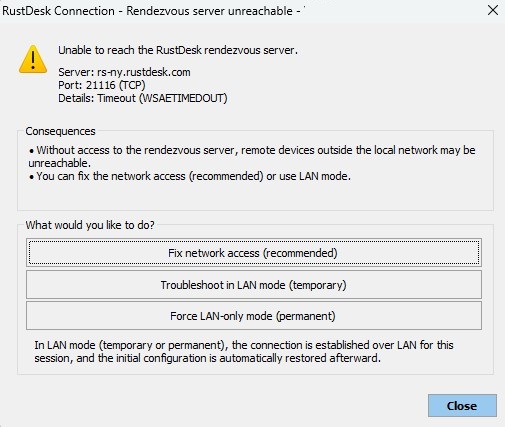
How to use the RustDesk remote control tool in IDEAL ADMINISTRATION?RustDesk rendezvous server is unreachable |
When I try to take control of a remote computer using RustDesk, a dialog box appears indicating that the RustDesk rendezvous server is unreachable. Why does this dialog box appear, and how can I fix the issue? |
❓ Why does this window appear?This window appears when the administration workstation is unable to establish an outgoing connection to the RustDesk rendezvous server. Example displayed: Server: rs-ny.rustdesk.com
This generally means that the Internet connection on this port is:
Without access to the rendezvous server, connections via ID (access outside the local network) may fail.
What is the rendezvous server?The RustDesk rendezvous server allows:
If it is unreachable, only direct local network (LAN) connections will work.
How to fix the issue?1. Check network connectivity From the administration workstation, run: Test-NetConnection rs-ny.rustdesk.com -Port 21116 If the test fails:
2. Check DNS Run: nslookup rs-ny.rustdesk.com If the IP address does not resolve:
3. Check corporate security policies In some environments:
In this case, you will need to:
|
| Betrifft auch folgende Software: IDEAL REMOTE |
| Letzte Änderung: 21/02/2026 |


IDEAL ADMINISTRATION 26.5.1
KOSTENFREIER DOWNLOAD
SOFTWARE
DIENSTLEISTUNGEN
SITEMAP
POINTDEV
ESPACE REVA2 ALLEE JOSIME MARTIN
13160 CHATEAURENARD
FRANCE


