


 Français
 English
 Español
 Italiano
 Русский

Espace Reva
2 allée Josime MARTIN
13160 CHATEAURENARD
FRANCE
Tel : 33 9 77 63 61 94
Faxnummer : 33 4 32 62 71 35 Tel: 33 9 77 63 61 94

FAQ : IDEAL ADMINISTRATION
Steuern Sie Ihr Active Directory in Echtzeit – ohne Agenten
How to use the RustDesk remote control tool in IDEAL ADMINISTRATION?How can I set a permanent RustDesk connection password on a client computer? |
I would like to be able to connect to client workstations on my network using the same password on each one. This would allow me to connect even if no one is at the keyboard to accept my connection. Is this possible? If so, how? |
|
Yes, this is entirely possible. In IDEAL ADMINISTRATION, you can configure a permanent RustDesk connection password on a client workstation in order to allow remote control without any action required from the user. This permanent password can be configured in two ways:
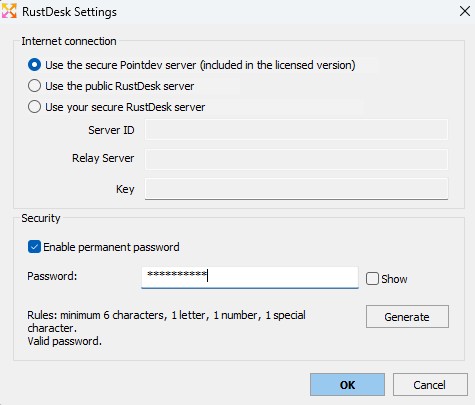
➡️ Recommended method: configure the password from IDEAL ADMINISTRATIONThe easiest method is to use the RustDesk configuration window integrated into IDEAL ADMINISTRATION. From the RustDesk management interface in IDEAL ADMINISTRATION, click the following button: Settings The RustDesk Settings window allows you in particular to:
To configure the permanent password:
The password must comply with the security rules shown in the window:
This method avoids having to manually open the RustDesk interface on the remote workstation in order to change the permanent password. ➡️ Why use a permanent RustDesk password?Once this permanent password has been configured, administrators can connect remotely to the client workstation:
This configuration is particularly useful for managed workstations, servers, or machines that need to remain accessible to IT support. ➡️ Recommended restriction: allow RustDesk only for administratorsWhen installing or configuring RustDesk from IDEAL ADMINISTRATION, it is recommended to enable the following option: Allow only administrators to use RustDesk This restriction helps prevent the workstation user from modifying certain RustDesk settings or using RustDesk for unauthorized connections. Since the use of RustDesk can be restricted to the workstation administrators, this configuration ensures:
➡️ Alternative method: change it from the RustDesk interfaceIt is also possible to change the permanent password directly from the RustDesk interface on the remote workstation. In this case, the steps are as follows:
✅ SummaryTo configure a permanent RustDesk password on a client workstation, the recommended method is to use the Settings button directly from IDEAL ADMINISTRATION. This centralized configuration makes it easier to manage the permanent password, the RustDesk server in use, and the connection settings, without having to manually work in the RustDesk interface on the remote workstation. |
| Letzte Änderung: 13/05/2026 |
Möchten Sie es selbst überprüfen? Testen Sie IDEAL ADMINISTRATION 30 Tage lang kostenlos.
Unverbindlich • Ohne Agent • Support inklusive • In 5 Minuten einsatzbereit


IDEAL ADMINISTRATION 26.8.5
30-TAGE-TESTVERSION HERUNTERLADE
SOFTWARE
DIENSTLEISTUNGEN
SITEMAP
POINTDEV
ESPACE REVA2 ALLEE JOSIME MARTIN
13160 CHATEAURENARD
FRANCE


