


 Français
 English
 Español
 Italiano
 Русский

Espace Reva
2 allée Josime MARTIN
13160 CHATEAURENARD
FRANCE
Tel : 33 9 77 63 61 94
Faxnummer : 33 4 32 62 71 35 Tel: 33 9 77 63 61 94

FAQ : IDEAL ADMINISTRATION
Steuern Sie Ihr Active Directory in Echtzeit – ohne Agenten
How to manage database inventories of Windows Active Directory Domain?How to extract information from database inventories? |
I conducted inventories of my computer park with your IDEAL Administration software, in particular the installed software, and now I would like to extract certain information. How can I do this, knowing that I do not have Microsoft Access software on my administration computer? |
|
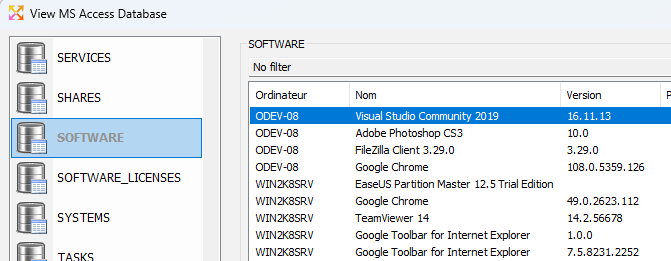
We have integrated a viewer in our IDEAL Administration software to display MS Access tables created with our software. Therefore, you will be able to easily view the inventoried information but also perform simple or complex queries to extract all desired information. To view the inventory database, use the "Inventory" menu, then select "View inventories".
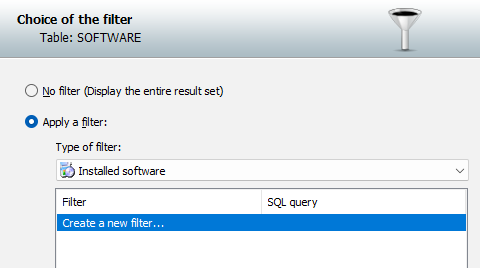
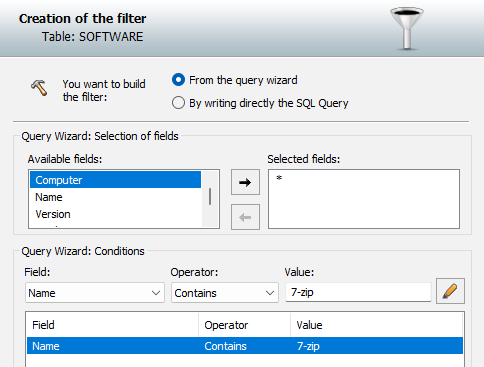
To perform a query, for example on installed software, go to the SOFTWARE table (explorer view), then select the "Filtering" button, then "Apply a filter".
This example allows you to list all computers on which software containing the word "7-zip" has been installed.
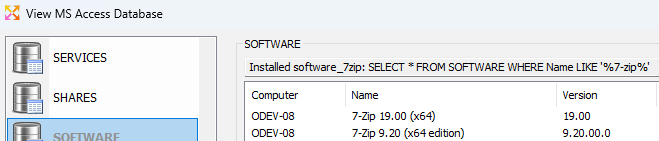
Once the query is executed, you will obtain the list of selected computers and software.
You also have the possibility to use an advanced mode, allowing you to enter the query to execute in text mode. Configured queries are saved and can be easily rerun on new collected data. Also read: How to export the information present in your software in CSV or HTML? |
| Letzte Änderung: 06/04/2023 |
Möchten Sie es selbst überprüfen? Testen Sie IDEAL ADMINISTRATION 30 Tage lang kostenlos.
Unverbindlich • Ohne Agent • Support inklusive • In 5 Minuten einsatzbereit


IDEAL ADMINISTRATION 26.8.5
30-TAGE-TESTVERSION HERUNTERLADE
SOFTWARE
DIENSTLEISTUNGEN
SITEMAP
POINTDEV
ESPACE REVA2 ALLEE JOSIME MARTIN
13160 CHATEAURENARD
FRANCE


