


 Français
 English
 Español
 Italiano
 Русский

Espace Reva
2 allée Josime MARTIN
13160 CHATEAURENARD
FRANCE
Tel : 33 9 77 63 61 94
Faxnummer : 33 4 32 62 71 35 Tel: 33 9 77 63 61 94

FAQ : IDEAL ADMINISTRATION
Steuern Sie Ihr Active Directory in Echtzeit – ohne Agenten
How to use the RustDesk remote control tool in IDEAL ADMINISTRATION?RustDesk Error: “The connection is not allowed” – what should I do? |
For the past few days, I have been getting the error message "The connection is not allowed" when trying to establish an Internet connection using the RustDesk remote control tool. Why does this error occur and how can I fix it? |
|
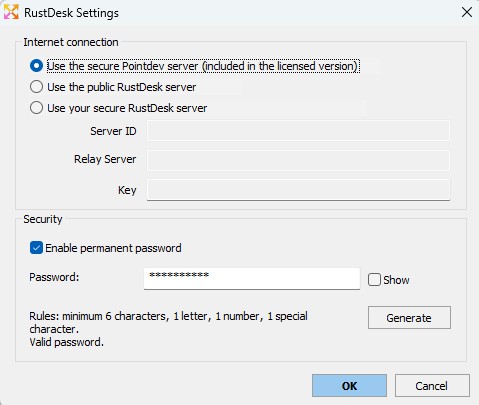
If the following message appears during a RustDesk connection in IDEAL ADMINISTRATION: “The connection is not allowed. Please log in first...” it means that the RustDesk public server is currently refusing the connection without authentication. This behavior may occur when the RustDesk public server applies additional restrictions, for example to limit abuse, attacks, or certain anonymous connections. ➡️ Why does this error appear?By default, RustDesk may use RustDesk public servers to establish certain remote connections. When these public servers temporarily or permanently enforce restrictions, some connections may be refused with the following message: “The connection is not allowed. Please log in first...” In this case, the issue does not necessarily come from the administrator workstation, the remote workstation, or IDEAL ADMINISTRATION, but from the policy applied by the RustDesk public server used for the connection. ➡️ What is the recommended solution with a licensed version of IDEAL ADMINISTRATION?With a licensed version of IDEAL ADMINISTRATION, you can select the Pointdev secure RustDesk server directly from the RustDesk configuration window in the software. This solution allows you to no longer depend on the RustDesk public server for remote connections. It is particularly recommended if you want to keep using RustDesk connections over the Internet while benefiting from an infrastructure better controlled by Pointdev. In this mode, IDEAL ADMINISTRATION uses the Pointdev secure RustDesk server instead of the RustDesk public server.
➡️ What are the advantages of the Pointdev secure RustDesk server?Using the Pointdev secure RustDesk server allows you to:
➡️ How do I select the Pointdev secure RustDesk server?In the RustDesk configuration window of IDEAL ADMINISTRATION, select the following server: Pointdev secure RustDesk server This option is available with the licensed version of IDEAL ADMINISTRATION. After changing the configuration, it may be necessary to restart the RustDesk service on the remote workstation so that the change is fully applied. ➡️ What is the immediate solution on a local network?If your workstations are on the same local network, another solution is to enable the following option: Force LAN-only mode In this mode, IDEAL ADMINISTRATION no longer uses any external RustDesk server to establish the connection. Communication is performed directly over the local network between the administrator workstation and the remote workstation. ➡️ Why does LAN-only mode also solve the issue?When LAN-only mode is enabled:
➡️ What are the limitations of LAN-only mode?This mode works very well in an internal environment, but it has one important limitation:
In other words, this mode is ideal for:
However, if you need to take control of workstations located off-site or over the Internet, it is preferable to use the Pointdev secure RustDesk server with a licensed version of IDEAL ADMINISTRATION. ➡️ Do I need to create a RustDesk account?No, not if you use LAN-only mode. With the licensed version of IDEAL ADMINISTRATION, using the Pointdev secure RustDesk server also helps reduce dependence on the constraints of the RustDesk public server. A RustDesk account is mainly required when you depend on the RustDesk public server and that server enforces authentication. ➡️ What if I want to use my own RustDesk server?IDEAL ADMINISTRATION also allows you to configure a custom RustDesk server. This architecture can be useful if your organization wants to use its own RustDesk infrastructure, with its own ID servers, relay servers, and configuration keys. It allows you to:
✅ SummaryIf the error “The connection is not allowed” appears:
For Internet connections, the recommended solution with IDEAL ADMINISTRATION is to use the Pointdev secure RustDesk server or a custom RustDesk server. |
| Letzte Änderung: 12/05/2026 |
Möchten Sie es selbst überprüfen? Testen Sie IDEAL ADMINISTRATION 30 Tage lang kostenlos.
Unverbindlich • Ohne Agent • Support inklusive • In 5 Minuten einsatzbereit


IDEAL ADMINISTRATION 26.8
30-TAGE-TESTVERSION HERUNTERLADE
SOFTWARE
DIENSTLEISTUNGEN
SITEMAP
POINTDEV
ESPACE REVA2 ALLEE JOSIME MARTIN
13160 CHATEAURENARD
FRANCE


