


 English
 Español
 Deutsch
 Italiano
 Русский

Espace Reva
2 allée Josime MARTIN
13160 CHATEAURENARD
FRANCE
Tél : +33 (0) 9 77 63 61 94
Fax : +33 (0) 4 32 62 71 35 Tél: +33 (0)9 77 63 61 94

FAQ : IDEAL DISPATCH
Déployez, exécutez et pilotez vos actions IT à distance depuis une interface unique
Quelques exemples de déploiement à l'aide du logiciel IDEAL DispatchAction VBScript - Comment déployer la création d'un raccourci sur le bureau des postes de votre réseau ? |
Comment créer un raccourci sur le bureau d'un fichier présent sur chacun de mes postes cibles ? |
|
Pré-requis : Scripts :
set WshShell = WScript.CreateObject("WScript.Shell")
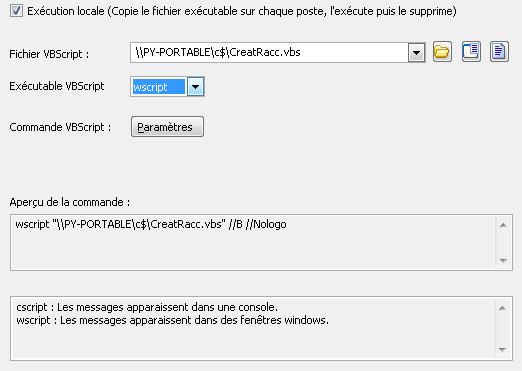
set WshShell = WScript.CreateObject("WScript.Shell" ) Vous devez configurer les arguments suivants :
|
| Dernière modification : 14/01/2011 |
Vous voulez vérifier par vous-même ? Testez IDEAL DISPATCH gratuitement pendant 30 jours.
Sans engagement • Sans agent • Support inclus • Prêt en 5 minutes


IDEAL DISPATCH 9.9
TÉLÉCHARGER L'ESSAI GRATUIT 30 JOURS
LOGICIELS
SERVICES
PLAN DU SITE
POINTDEV
ESPACE REVA2 ALLEE JOSIME MARTIN
13160 CHATEAURENARD
FRANCE


