


 Français
 Español
 Deutsch
 Italiano
 Русский

Espace Reva
2 allée Josime MARTIN
13160 CHATEAURENARD
FRANCE
Tel : 33 9 77 63 61 94
Fax : 33 4 32 62 71 35 Tel: 33 9 77 63 61 94

FAQ : IDEAL REMOTE
Take remote control of all your systems, simply and securely
Windows Security Center ManagementHow to remotely configure Windows Firewall? |
I would like to turn on or off Windows Firewall on several computers of our domain. How can I do and is it also possible to create an exception in the firewall (authorize a program)? |
|
First, download the free 30 day version of our software if you have not installed it yet: Download IDEAL Administration. Once installed, just execute it under a domain admin account. Use the right click on the remote computer and select Security Center. You may use the "Firewall" tool from the Security Center to remotely configure your computer firewalls (Windows XP / SP2 or greater OS. "Remote Registry" service must be up and running on these computers).
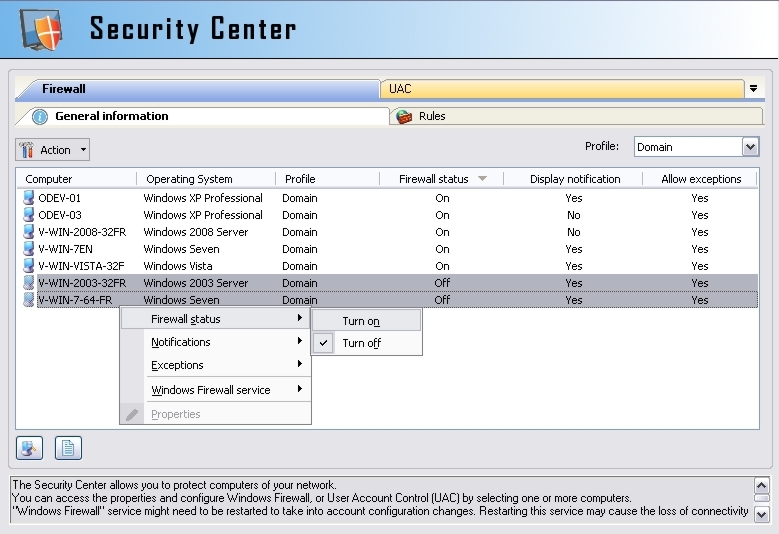
For doing so, open the "Computers" menu, then "Security Center". You can also make a multi-selection from the right view on the desired computers, then right click "Security Center". Computer selection can also be modified by clicking on the
In this tab, you can access the firewall parameters for the selected computers, depending on the profile : domain, standard (or private from Vista OS), public (from Vista OS). You can select one ore more computers, then apply the desired action by clicking on the To be immediately taken into account, a change may required restarting "Windows Firewall" service on the remote computer. Finally, it is also possible to access the firewall properties of a computer by double-clicking on the right line.
This tab allows you to display existing rules on the selected computers, depending on the profile, on the type (program/port) or on the traffic (inbound/outbound). To create a rule : - Select one ore more computers (no selection in the list = "All the computers of the list"). - Click the - Fill in the required information. To be immediately taken into account, creating/modifying/deleting a rule may required restarting "Windows Firewall" service on the remote computer. Finally, it is also possible to access the properties of a rule, by double-clicking the selected rule. |
| Also concerns the following software: IDEAL ADMINISTRATION |
| Last modification: 09/23/2019 |
 button.
 button, or by right-clicking. Example: "Firewall status", "Turn on".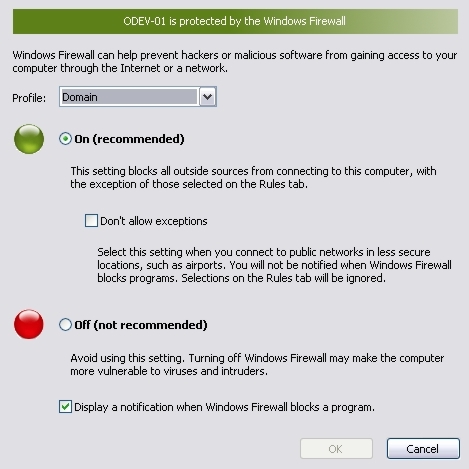
Want to check for yourself? Try IDEAL REMOTE free for 30 days.
No commitment • No agent • Support included • Ready to use in 5 minutes


IDEAL REMOTE 26.7
DOWNLOAD FREE 30-DAY TRIAL
SOFTWARE
SERVICES
SITEMAP
POINTDEV
ESPACE REVA2 ALLEE JOSIME MARTIN
13160 CHATEAURENARD
FRANCE


