
 Français
 English
 Español
 Deutsch
 Italiano
 Русский

ADMINISTRATION

Цена от 389 евро
См Полный прайс-листСовместимость с
- Windows Server 2025
- Windows Server 2022
- Windows Server 2019
- Windows Server 2016
- Windows Server 2012
- Windows Server 2008
- Windows 11
- Windows 10
- Windows 8
Доступно в


IDEAL ADMINISTRATION
Version 26.8.5НОВОСТИ
IDEAL ADMINISTRATION
Version 26.8.5НОВОСТИ
IDEAL ADMINISTRATION
Version 26.8.5НОВОСТИ
Без обязательств • Без агента • Поддержка включена • Готово к использованию за 5 минут
На этой странице представлены новые функции, улучшения и оптимизации, направленные на максимальное соответствие потребностям системных администраторов.
-
28/11/2019New features in version 19.7
- Accelerated loading of Displayed Properties for online computers (right view)
- Differentiation between "Access denied" / "Offline" statuses. Previously all statuses were noted "Access denied" even if computers were unreachable
- Add a remote printer: This function could not work if the administration station was under Windows 10
- Real-time update of computer icons according to their status: Online / Access denied / Offline
- New icons used to replace older ones
- Update the installation package
Do not hesitate to contact us on support@pointdev.com if you notice an abnormal functioning of the software or if you have an improvement to suggest us.
-
14/11/2019New features in version 19.65
This new version fixes and enhances some features of the software.
- Applying a fix when the remote control time of Windows 10 computers is too long (Please read: https://www.pointdev.com/en/faq/faq-id-980.html).
- Loading computer properties (left view) could cause excessive CPU usage.
- Automatic configuration of a default domain controller for each domain to speed up load and access speeds to endpoints.
- Accelerated TightVNC remote control: Improved pre-requisite verification, better Aero system management, detection of Antivirus slowdown.
- The dialog box "Properties" of a remote computer could be long to display, it is corrected.
- Warning message if the remote registry access services (RemoteRegistry) are not started.
- Warning message if WMI services are not allowed remotely.
- Better management of creating / deleting a directory / share when creating / deleting a user.
- Added information in our FAQ online: https://www.pointdev.com/en/faq/faq.php?product=ia
Do not hesitate to contact us on support@pointdev.com if you notice an abnormal functioning of the software or if you have an improvement to suggest us.
-
25/06/2019New features in version 19.5
- REMOTE CONTROL TOOL
- Ability to automatically initiate the remote control functions from the command line:
- IA.EXE TVNC /computer:ComputerName: TightVNC remote control of ComputerName
- IA.EXE TVNC: TightVNC remote control with request of the computer name
- IA.EXE RDP /computer:ComputerName: Remote Desktop control (Windows) of ComputerName
- IA.EXE RDP: Remote Desktop control (Windows) with request of the computer name
- Example: create a desktop shortcut such as "C:\Program Files (x86)\Pointdev\IDEAL Administration\IA.EXE" TVNC to automatically launch IDEAL Administration in remote control in requesting the name of the remote station.
- Ability to automatically initiate the remote control functions from the command line:
- DOMAIN PRINTERS (ACTIVE DIRECTORY)
- Manage Printers present in your Active Directory Domain:
- Microsoft Windows Network: New Domain printers Folder
- Active Directory Network: Managing Printers objects: Properties, Open, Rename, Move, Delete
- Active Directory Search: search for a printer
- Browse mode by object type: List all printers in Active Directory (menu Action \ Browse Mode \ By Object Type)
- Database Inventory (menu Active Directory Objects \ Printers)

- Manage Printers present in your Active Directory Domain:
- WINDOWS SERVER 2019
- Identification of Windows Server 2019 in the software
- Compatibility tests
- VARIOUS
- Display of the UBR value (Update Build Revision) of the computers in the Microsoft Windows Network list.
This value is used to know the latest update installed on the computers and servers.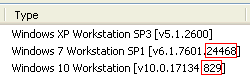
- The configuration wizard might not retrieve the domain name in Windows 2016 & +.
- Display of the UBR value (Update Build Revision) of the computers in the Microsoft Windows Network list.
- Some fixes.
- Documentation update.
- REMOTE CONTROL TOOL
-
21/01/2019New features in version 19.21
- ACTIVE DIRECTORY REPORTS
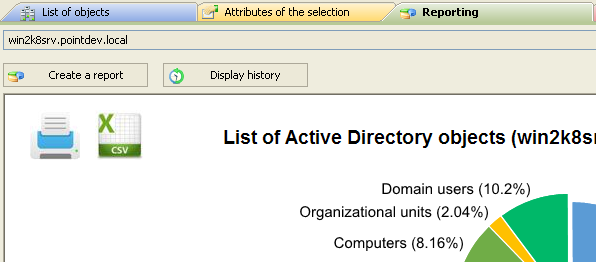
- All Active Directory reports are now generated in CSV format in addition to HTML. These CSV files can be easily exploited under MS Excel, MS Access or any other software
- Ability to select the "separator" character " (';', ',', or 'TAB') for creating the CSV file
- COMPUTER ACCOUNT
- Adding Account Enable / Disable Feature: Active Directory Properties
- MODIFYING IP ADDRESSES REMOTELY
- Automatic recognition of the new IP address
- Fixed a bug when multiple network adapters available on the remote computer
- SESSIONS AND OPEN FILES MONITORING
- Simplifying of the configuration for the monitoring service (Monitor menu)
- IMPROVEMENTS AND CORRECTIONS
- Exporting lists: Adding a button Check all / Uncheck all
- Shutdown / Restart: Fixed a bug that could occur on Windows 10
- Active Directory Search: Adding Windows Server 2016 to the list of operating systems
- User password: Better management of complex passwords when creating a user
- Some fixes
- Documentation update
- ACTIVE DIRECTORY REPORTS
-
17/09/2018New features in version 19.1
- NEW VERSION FOR THE REMOTE CONTROL TOOL
- Integration of TightVNC 2.8.11 for more speed and stability
- Some fixes
- Translation into French, German, Italian and Spanish
- Digital signature of executables
- The update of this new version on the clients and the servers is done automatically
- IMPROVED CERTAIN FUNCTIONS FOR MORE SPEED
- TEST COUNTER RESET
- Some modifications and fixes
- Documentation update
- NEW VERSION FOR THE REMOTE CONTROL TOOL
-
30/03/2018New features in version 18.2.x
- REMOTE CONTROL TOOL
- New management for automatically adding a rule in the Windows Defender Firewall (Windows 10 & Windows 2016 Server) allowing remote control.
- In fact, the new Windows Defender Firewall no longer allows it to restart for security issues.
- This new firewall management is also compatible with Windows 7 / Windows 2008 Server / Windows 2012 Server.
- Fixed a bug when the size of the authorization message exceeded 250 characters.
- INTERNET REMOTE CONTROL
- Integration of TightVNC 2.8.8 in Pointdev Remote Control (PRC) for faster and stability.
- Full translation into French, German, Italian and Spanish.
- Digital signature of executables.
- Fixed a bug that could limit the number of computers displayed in the tab Internet Remote Control of the software.
- REMOTE COMMAND LINE TOOLS
- You can now run the netsh command, which allows you to configure the remote firewall. We added by default a rule to allow the remote WMI management in the Windows 10 Defender Firewall. This rule is added when you first install the software, but you can add it manually: Tools menu, Options, Tools, Command Prompt Tools, Add button.
Add the following line: netsh advfirewall firewall add rule dir=in name=WMI program=%systemroot%\system32\svchost.exe service=winmgmt action=allow protocol=TCP localport=any
To execute this command on one or several computers, just right click on the selected computers (right view) and select Command Prompt Tools.
- You can now run the netsh command, which allows you to configure the remote firewall. We added by default a rule to allow the remote WMI management in the Windows 10 Defender Firewall. This rule is added when you first install the software, but you can add it manually: Tools menu, Options, Tools, Command Prompt Tools, Add button.
- Some modifications and fixes.
- Documentation update.
- REMOTE CONTROL TOOL
-
02/01/2018New features in version 18.0
- NEW VERSION FOR THE REMOTE CONTROL TOOL
- Integration of TightVNC 2.8.8 for more speed and stability.
- Translation into French, German, Italian and Spanish.
- Digital signature of executables.
- The update of this new version on the clients and the servers is done automatically.
- REMOTE CONTROL FROM SMARTPHONE OR TABLET
- You can now easily take control of your client computers and Windows servers using your smartphone and tablet.
- This function needs a WIFI network within your organization for smartphone and tablet connection.
- We explain everything in our online FAQ:
https://www.pointdev.com/en/faq/faq-ideal-administration-how-remote-control-computer-smartphone-tablet-id-949.html - This feature is compatible with iOS and Android smartphones and tablets.
- TEST COUNTER RESET.
- Some modifications and fixes.
- Documentation update.
- NEW VERSION FOR THE REMOTE CONTROL TOOL
-
04/07/2017New features in version 17.2
- Windows Microsoft Network
- List Domain Computers from Active Directory
- This new version uses the current Active Directory domain by default to list all computers in the domain. You can activate this function if the domain is already configured in a tab. For it, use the "Filter" button to the right of the domain name (right view) then "Configure \ Apply a filter \ List computers by Active Directory Domain", "Apply".
- Previously, the list of computers was by default obtained by Netbios and it was possible that you don't have all the computers in the list.
- The routines for displaying information from client computers and servers have been reviewed and improved.
- List Domain Computers from Active Directory
- Filtering: Adding a filter for Windows Server 2016
- Rename a computer
- Acceptance of the character "_" in the new computer name.
- Default tabs
- The default tabs are added when the software is run under a different user's profile.
- Some modifications and fixes.
- Documentation update.
- Windows Microsoft Network
-
25/11/2016New features in version 17.0
- Remote Control Tool
- New ultra fast version of Remote Control Software
- The viewer and server have been completely redesigned for a much better display and control.
- IDEAL Administration installs and configures the 32-bit or 64-bit version of the remote control depending on the type of local or remote operating system (Gain in Speed).
- This new version is updated automatically on clients and servers.
- Clipboard transfer can be deactivated (menu "Control", "TightVNC Settings", "Advanced" tab).
- Aero system of the remote client is automatically stopped (if configured) even if the remote user does not have enough rights.
- TSE Remote Desktop
- Remote Shadowing management for Windows 10, Windows Server 2012 R2 and Windows Server 2016. Remote Shadowing lets you remotely view a user's session via RDP.
- You can find this new feature here: right-click on a server, Remote Control, Remote Desktop Shadow, and in the Sharing and Printing Center (Terminal Services Sessions tab, Action menu, Remote Shadow).
- System Event Inventory
- Possibility of selecting the event type for database exports (Information, Warning, Error, etc.).
- System Events
- Added Stop button to stop full loading of events.
- Saving and recalling the size of the window.
- NetBIOS Authentication
- Possibility to execute the "Logon as..." command on several computers at the same time.
- Wake On Lan Logging
- Database logging (AUDITS_LOGS table) for automatic wake up of computers.
- Windows Server 2016
- Integrating and managing of the new operating system.
- Low Level Editor
- Added a description for each ADS types.
- Test counter reset.
- Some modifications and fixes.
- Documentation update.
- Remote Control Tool
-
26/07/2016New features in version 16.7
- Active Directory Reporting:
- New category "Restoring": allows you to list and restore Active Directory objects that have been recently deleted.
- "Cleaning" category: Adding reports "Disable expired computer accounts" / "Deactivate inactive computer accounts" / "Disable expired users" / "Deactivate inactive users".
- IP parameters:
- You can now remotely change the IP address of the DNS Server (computer properties, "Network" tab, "Action" button then "Modify IP Settings").
- Database inventories:
- It is now possible to inventory an entire domain or workgroup. The list of target computers is automatically retrieved. Menu "Inventory", "Inventory / Schedule".
- Some modifications and fixes.
- Documentation update.
- Active Directory Reporting:
-
23/05/2016New features in version 16.5
- Instant Active Directory Cleanup
- New category "Cleaning" in the Active Directory Report tab that allows to remove objects from the AD according to certain criteria.
- Cleaning of empty groups, empty OUs, inactive users and computers accounts, disabled users and computer accounts, expired users and computer accounts, reset sIDHistory (users and groups).
- Active Directory Templates
- New "Computer" template (Active Directory Network tab) that allows you to create templates on your computers objects.
- Sending Emails
- New feature "Send Email" to users, contacts or members of a group.
- A button has been added on the properties page of these objects to send an email to the selected recipients.
- User Accounts (Complex Password)
- When creating / modifying a user, you can now automatically generate and assign a complex password (between 6 and 14 characters).
- Pointdev Remote Control
- Security has been improved when changing the password of your Pointdev Remote Control account.
- Printers
- Fixed an issue with adding a remote printer on a Windows 10 workstation.
- Instant Active Directory Cleanup
-
02/02/2016New features in version 16.2
- Active Directory Templates
- New "Templates" feature (Active Directory Network tab) that allows you to create templates of your Active Directory objects: User groups, users, contacts, organizational units.
- When creating an Active Directory object, you can select an existing template to prefill the different attributes (right click in the Active Directory view then "New from template").
- Active Directory Reports
- "Operating Systems" reports type can now also be represented as a bar chart.
- TightVNC (Remote Control)
- Simplification of the authorization request by checking the box "Always prompt the user to accept the connection" (Control menu, TightVNC configurator, "Authorization" tab).
- When this option is enabled, the remote user is notified by a message and can accept or reject the connection.
- The information sent to the user can be set by clicking the "Advanced" button (your user name, your IP address, NetBIOS name of your computer and a specific message).
- Sharing and Printing Center
- It is now possible to add a printer without any selection in the list.
- Tab management in the right view
- Tabs of type "Remote Control History", "Favorites/VPN", "Tools" are automatically refreshed in the right view when clicking (focusing) the concerned tab.
- Appearance: tabs are now adjusted by default according to their text size. You can change this setting from the "Tools" menu, "Options", "General," "Tabs" "Width" parameter.
- Some modifications and fixes.
- Documentation update.
- Active Directory Templates
-
16/10/2015New features in version 16.0
- Full HTML reports from Active Directory
- New "Reporting" feature (Active Directory Network tab) that gives you full real-time information about your Active Directory objects through different HTML reports: Organizational units, User groups, Users, Computers, Contacts, GPOs, Miscellaneous.
- The reports are generated in HTML to be printed and shared by IT administrators.
- The reports can be stored in the history to reopen at anytime a previous state of your Active Directory.
- The reports can be planned and automated trough the creation of a scheduled task.
- Examples of reports: Empty groups, Group type, Disabled computer accounts, Operating systems, Computer type, Empty OUs, User passwords age, Expired user accounts, Last logon time ...
- Watch Reporting Demo on YouTube
- Microsoft Windows Network
- Column "Status" added (in the right view) to indicate whether the computer is "Online", "Offline", or "Acces is denied".
- Fixed a problem with the "last boot up time" column that could disappear from the list with some configurations.
- Test counter reset
- Some modifications and fixes
- Documentation update
- Full HTML reports from Active Directory
-
06/07/2015New features in version 15.7
- Sharing and Printing Center
- Added the tab "Printers" in Sharing and Printing Center to list and manage printers from one or more computers.
- Scheduling computer shutdown
- You can now plan schedule the shutdown of one or more computers and configure the stop parameters: right click a computer, Shutdown, Schedule button.
- Pointdev Remote Control
- Some fixes and improvements.
- Database inventories
- Fixed a problem that could occur with "User accounts" inventories and recording of computers (COMPUTER_LOGS).
- Microsoft Windows Network
- When you first launch the software, all the computers in your domain are now listed in the Microsoft Windows Network tab (including unreachable computers appearing with a red cross).
- This option can be configured from the "Tools" menu, "Options", "General" "Display all domain computers"
- Windows 10
- Version number of Windows 10 has been updated to take into consideration this type of OS in the main view, in the filters and in the "Computer properties" dialog.
- Some modifications and fixes.
- Documentation update.
- Sharing and Printing Center
-
07/05/2015New features in version 15.6
- Remote control over the Internet
- New Internet Remote Control Module for your Windows computers (Windows XP to Windows 2012 Server).
- You can create lists of computers that are outside your network. These lists can be personal or for all administrators of your company. After installing our "Pointdev Remote Control" agent on the remote computers, you can easily take control of them from IDEAL Administration.
- Active Directory Network
- In the right view of the software ("Active Directory Network" tab, "List of objects", "Actions", "Browse mode"), you can now browse the different elements of the Active Diretcory by type of object (OU, Groups, Users, Workstations, Servers).
- This setting is saved and restored for each tab when reopening the program.
- You can easily switch back to the default browse mode (browse by address).
- Database inventories
- Query Wizard and filter: operators "starts with", "ends with", "contains" have been added to help you build the SQL query.
- Test counter reset.
- Some modifications and fixes.
- Documentation update.
- Remote control over the Internet
-
14/03/2015New features in version 15.3
- Active Directory Network
- In the right view of the software ("Active Directory Network" tab/ List of objects"), you can now switch to a detailed view to show all configured Active Directory attributes: Action button, Display of attributes, Detailed view.
- This setting is saved and restored for each tab when reopening the program.
- You can easily switch back to the default view.
- Active Directory properties
- In the right view of the software ("Microsoft Windows Network" tab) properties coming from Active Directory are now displayed faster when the remote computer is unreachable.
- Database inventories
- The fields "Creation date" and "Modification date" have been added to inventories based on Active Directory object (organizational units, groups, computer accounts, users, contacts).
- You can now export to database a file or directory located on multiple computers ("Inventory" menu, "Files and directories").
- User-friendly
- A small arrow has been added on "Microsoft Windows Network" tabs (right view of the software). It allows to switch the view to a simple mode and hide some controls (eg list of domains, ...) to save space on the screen. This setting is saved and restored for each tab when reopening the program.
- All the "treeview" controls are now designed with Vista theme buttons (expand/collapse) even on computer running Windows XP.
- Some modifications and fixes
- Documentation update
- Active Directory Network
-
01/12/2014New features in version 15.2.x
- Computer properties
- Performance tab added: real-time graphs showing the CPU usage and swap file.
- Disk usage tab added: real-time graph showing the usage of disks.
- Networking tab added : real-time graphs showing the network usage.
- Boot tab added : lists startup elements.
- Codecs : lists audio and video codecs.
- The dialog box has been redesigned.
- Sharing Center
- The new option Sharing Center allows on the "right click" of one or more computers to manage shared folders, opened files, user sessions and Terminal Services sessions.
- Windows 10
- Windows 10 computer type is now supported in the main view, in filters and in the "Computer properties" window.
- Product ID
- Fixed an issue in the main view. The product ID was not displayed for some configurations.
- Database inventories
- Fixed a problem with the structure of the SQL Server database.
- Remote shutdown of computers
- Fixed a problem with multiple shutdown of machines.
- Some modifications and fixes
- Documentation update
- Computer properties
-
20/08/2014New features in version 15.0
MAJOR UPGRADE WITH TEST COUNTER RESET
- Group Policy Objects
- You can now manage your domain GPOs directly from our software from the "Active Directory Network" tab.
- You can list, create, edit, delete or inventory your domain GPOs in database.
- Recording of computers in database
- You can choose to automatically enable recording of computers and their properties in database.
- Properties of turned off or unreachable computers (eg red crosses) will be displayed in the list according to the latest information retrieval ("Microsoft Windows Network" tab, in the right view).
- These properties are regularly kept up to date in database.
- This setting is available from the "Tools" menu, "Options", "Database", "Computers".
- Remote shutdown of a computer
- You can now specify the reason for shutdown to fill in more precisely event logs.
- The remote shutdown of a computer is now stored in database (AUDIT_LOGS table).
- Physical memory
- Fixed a problem with recovery of RAM for a computer.
- Last boot up time
- The "System up time" property could be incorrect if the computer was on for longer than 49 days. The last boot up time is now correctly displayed.
- Adding an Active Directory tab
- You can now choose the OU of destination.
- Licenses management
- You can now deactivate by yourself a license on a computer through the windows "License history".
- Some modifications and fixes
- Documentation update
- Test counter reset.
- Group Policy Objects
-
30/05/2014New features in version 14.7.x
IMPORTANT UPGRADE WITH TEST COUNTER RESET
- Configuration Wizard
- A wizard helps you and guides you step by step to configure your software when running it for the first time.
- You can configure your Active Directory and WMI access rights, select tabs to display in the main view, or check the prerequisites for use in our online FAQ to get the most out of your software.
- Filtering computers
- You can now select from the main view ("Microsoft Windows Network" tab) an existing filter by clicking on the "Filter" button.
- Software configuration
- This dialog box has been redesigned ("Tools" menu, "Options").
- Tabs positioning
- Fixed a graphical bug when the tab system was configured with a vertical orientation.
- Test counter reset
- Configuration Wizard
-
06/03/2014New features in version 14.5
- Wake On LAN
- This dialog box has been redesigned.
- The Wake On LAN configurations of your computers are now stored in database for easy processing.
- To automatically populate this database, you can right-click on ore more computers then "Wake On LAN".
- Data retrieval is now faster and multi-threaded.
- You can also add / modify a configuration manually.
- You can wake up occasionally one or more computers by selecting them in the list via the checkbox and clicking "Wake up".
- Or manage repeatedly and automatically the wake up of your computers by creating a scheduled task.
- Task Scheduler
- The node "Task Scheduler Library" was added in the left explorer view under "Scheduled Tasks (v2.0)" and allows you to list tasks by folder.
- Favorites / VPN
- Your folders now appear in a configurable toolbar.
- Database inventories
- The node "Database inventories" was added in the left explorer view under a "Computer" object to quickly access the records of this computer.
- History of connections
- From the main view of the software, "History of connections" tab, you can now view the entire history by selecting in the list "Whole period".
- Installed software
- An option was added to list or not some Microsoft hotfixes that may appear in the "Installed Software".
- Active Directory Network
- You can define the visibility of an Active Directory server ("Network Active Directory" tab) from the "Tools" menu, "Options", "Active Directory".
- Some modifications and fixes
- Documentation update
- Wake On LAN
Цена от 389 евро
См Полный прайс-листСовместимость с
- Windows Server 2025
- Windows Server 2022
- Windows Server 2019
- Windows Server 2016
- Windows Server 2012
- Windows Server 2008
- Windows 11
- Windows 10
- Windows 8
Доступно в
IDEAL ADMINISTRATION 26.8.5