
 English
 French
 Spanish
 German
 Italian
 Russian

POINTDEV
Espace Reva
2 allée Josime MARTIN
13160 CHATEAURENARD
FRANCE
Tel : 33 9 77 63 61 94
Fax : 33 4 32 62 71 35 Tel: 33 9 77 63 61 94
Espace Reva
2 allée Josime MARTIN
13160 CHATEAURENARD
FRANCE
Tel : 33 9 77 63 61 94
Fax : 33 4 32 62 71 35 Tel: 33 9 77 63 61 94

FAQ : IDEAL Dispatch
Remote Deployment and Uninstallation of Windows Software
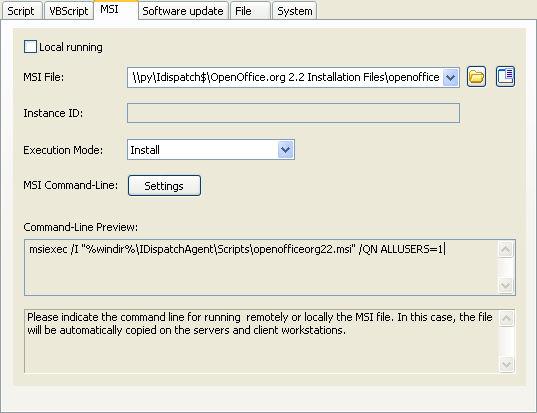
Some examples of deployments by using IDEAL DispatchMSI Action: How to remotely install Open Office with MSI? |
Example n°9: Remotely installing Open Office with a MSI |
|
Remote running means that the program to be installed must be present on another PC in the network. On a file server, for example. Description: Run the file OOo_2.2.1_Win32Intel_install_wJRE_fr.exe without installing it, then launch the file openofficeorg22.msi from the created directory in remote installation. You must configure the following arguments:
|
| Last modification: 10/04/2017 |

Previous

Next
Back to the list


IDEAL Dispatch 9.9
DOWNLOADFREE VERSION
SERVICES
SITEMAP
POINTDEV
Espace Reva2 allée Josime MARTIN
13160 CHATEAURENARD
FRANCE
| Phone: | 33 9 77 63 61 94 |


