


 Français
 Español
 Deutsch
 Italiano
 Русский

Espace Reva
2 allée Josime MARTIN
13160 CHATEAURENARD
FRANCE
Tel : 33 9 77 63 61 94
Fax : 33 4 32 62 71 35 Tel: 33 9 77 63 61 94

FAQ : IDEAL ADMINISTRATION
Control your Active Directory in real time, without agents
How to configure the TightVNC remote control tool (screen sharing)?Can I request for the remote user to authorize the connection? |
When launching TightVNC remote control, is it possible to display on the remote host an authorization request? If it is, which authentication information can be sent to the remote computer? Is it also possible to define a blacklist of IPs addresses, or to authorize some IPS? |
|
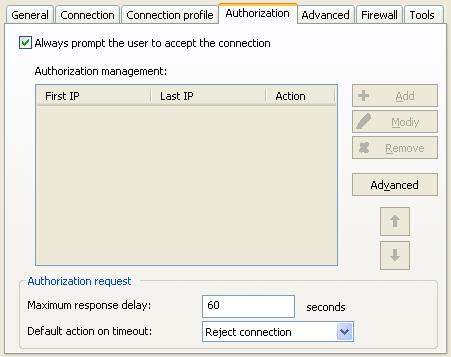
Yes, it is possible to manage IPs addresses of computers allowed to connect to a computer, and also to ask the user to authorize or not the remote control. From our software, right click the remote computer, then "Taking remote control", "Configure", "Authorization" tab. You may also directly access to the desired configuration through the "Tools" menu, "TightVNC Settings".
- Version 2.X of the remote control tool You can create as many configurations as you wish (eg a configuration "Station Config" requiring the acceptance of the connection by the remote user and a configuration "Server Config" which does not require an authorization).
You can also "force" the use of a specific TightVNC configuration when taking remote control (right click on the computer then "Remote control with the configuration").
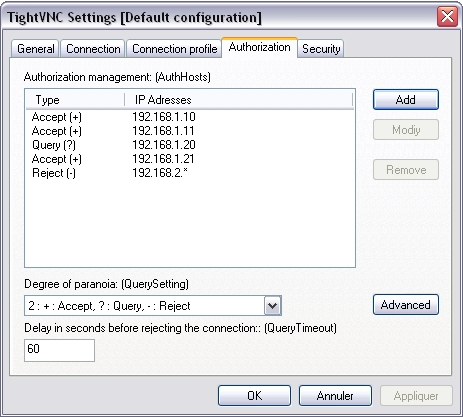
- Version 1.X of the remote control tool:
This setting is used to specify the action to execute on the remote host, for each IP address (or address template) , regarding incoming connections. By default, this list is empty and all connections from all computers will be accepted. Here are the available types : (+) : Accept (?) : Query (-) : Reject In the above example, one must understand: - Incoming connections from computers which IP address is 192.168.1.10, 192.168.1.11 or 192.168.1.21are accepted. - Incoming connections from computer which IP address is 192.168.1.20 are submitted to validation from remote computer side (the user can accept ou reject the connection). - All remote control requests will be rejected for computers which IP address is 192.168.2.1, 192.168.2.2, ..., 192.168.2.9.
This setting allows to define the security policy to apply on the remote host, regarding incoming connections. A "paranoia degree" is a value ranging from 0 (maximum availability) to 4 (maximum security). This option goes together with the "AuthHosts" setting. The following tables indicates how "QuerySetting" values affect the "AuthHosts" behaviour. 0 - +:Accept, ?:Accept, -:Query 1 - +:Accept, ?:Accept, -:Reject 2 - +:Accept, ?:Query, -:Reject [Default] 3 - +:Query, ?:Query, -:Reject 4 - +:Query, ?:Reject, -:Reject By default, the degree of paranoia is defined on value 2 (that means obey "AuthHosts" will be assumed). By supposing we define the degree of paranoia on value 3 (+:Query, ?:Query, -:Reject). Taking our previous example, behaviour regarding incoming connections on the remote host is going to change. Indeed, all the IPs addresses which were previously accepted (defined with "+" in AuthHosts) will be now submitted to validation from remote side (and therefore considered as a "?"). One must understand : - Incoming connections from computers which IP address is 192.168.1.10, 192.168.1.11 and 192.168.1.21are submitted to validation from remote computer side (the user can accept ou reject the connection). - Incoming connections from computers which IP address is 192.168.1.20 are submitted to validation from remote computer side (the user can accept ou reject the connection). - All remote control requests will be rejected for computers which IP address is 192.168.2.1, 192.168.2.2, ..., 192.168.2.9. Another case, if we define the degree of paranoia on the value 3 or 4, and the AuthHosts list is empty. All the incoming connections on the remote computer, from whatever computer which has launched the remote control, will be submitted to validation from remote computer side (the user can accept ou reject the connection).
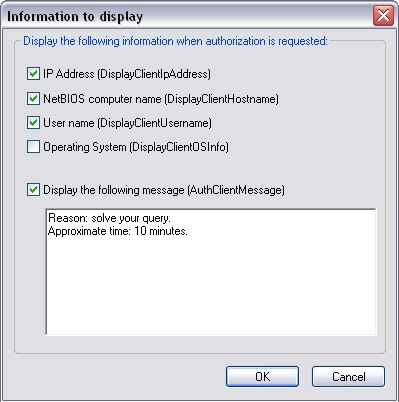
It is possible to define which information will be sent on the remote screen, when authorization is requested.
Finally, you may also define the maximum delay (in seconds) to let the user accept or reject your connection request. Once this delay has been exceeded and if the user has still not answered (or is not in front of the screen), connection is rejected.. |
| Also concerns the following software: IDEAL REMOTE |
| Last modification: 08/27/2020 |
Want to check for yourself? Try IDEAL ADMINISTRATION free for 30 days.
No commitment • No agent • Support included • Ready to use in 5 minutes


IDEAL ADMINISTRATION 26.7
DOWNLOAD FREE 30-DAY TRIAL
SOFTWARE
SERVICES
SITEMAP
POINTDEV
ESPACE REVA2 ALLEE JOSIME MARTIN
13160 CHATEAURENARD
FRANCE


